


Tody - Smarter Cleaning
4.72.53K Reviews
App Specs
- Version
- 3.6.7
- Updated On
- License
- Free
- Downloads
- 1,000,000+
- Developer
- LoopLoop Aps
- Categories
- House & Home
- Platform
- Android, iOS
Screenshots
 Analysis by AppCompare
I like a cleaning app best when it helps me decide what actually needs doing, rather than turning every chore into a date I can fail to meet. That is the useful idea behind Tody - Smarter Cleaning: it gives household tasks a sense of priority and progress without treating a home like a rigid timetable. In my experience, that makes it more practical than a plain checklist for people who want a routine but do not want cleaning to dominate their week.
It is a free house-and-home app from LoopLoop Aps, and its appeal is easy to understand: a clear place to organize rooms, chores, and the rhythm that suits your household. Its average rating is 4.8 from around 21,000 ratings, and it has over a million installs. Those figures suggest it has found an audience, but the more important question is whether its approach fits the way you prefer to manage chores.
A priority system that feels less rigid
Most basic to-do apps ask me to choose a day and then leave me staring at an overdue task if life gets in the way. Tody’s task-centered approach is more forgiving: I can look at what needs attention and choose a realistic job for the time I have. That distinction matters in a home where a busy week, unexpected guests, or a change in routine can make a fixed schedule feel pointless.
I would not treat its visual signals as a verdict on whether I am keeping house properly. They are more useful as a quick sorting aid: when I have ten minutes, I can pick one manageable task instead of mentally scanning every room. That small change lowers the barrier to starting, which is often the hardest part of cleaning.
Building a routine that survives real life
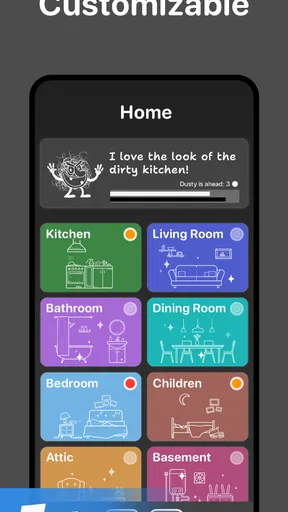
Getting started means adding rooms and choosing the tasks that belong in each one, then setting how often you want to handle them. I recommend beginning with only the chores that repeatedly slip your mind. If you try to represent every possible household job at once, the setup itself can become another chore and the list may feel discouraging before it has helped.
After a couple of weeks, review the intervals rather than assuming your first choices are correct. A kitchen surface used throughout the day may need attention more often than a guest room, while a bathroom shared by several people may need a different rhythm from one used by a single person. The useful habit is to tune the plan to how your home is actually used, not to aim for an idealized schedule.
Progress you can use, not just admire
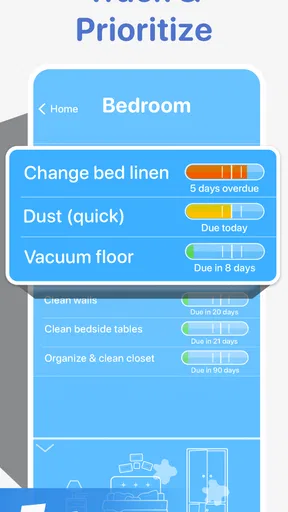
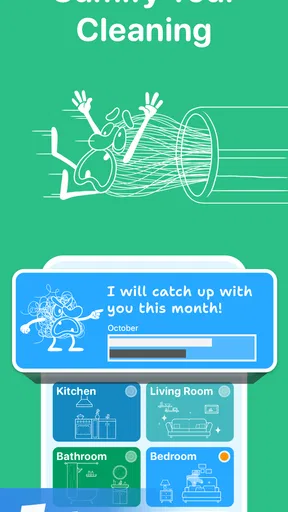
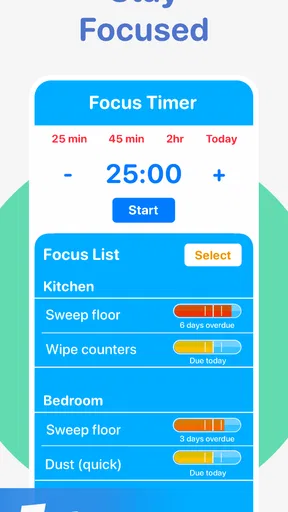
The visual tracker gives completed work a visible payoff, while the color coding makes it easier to spot tasks that deserve attention. I find that combination more helpful than a long alphabetical list, especially when I want to choose a quick job without planning a full cleaning session. It turns progress into something I can read at a glance.
Worth Reading Before You Choose

Flipboard Shows What News Apps Must Do Beyond the Feed

Switching to Android Auto Means Rethinking Your Driving Routine

Google Calendar Makes a Crowded Week Easier to Manage

Ludo King Makes the Most of the Minutes Between Plans

Baby Panda World Brings Quick Play to Modern Phones, but Its Game Library Feels Busy

ESPN’s Live Game View Makes Following Close Games Easier
There is a trade-off, though: any progress display can become one more thing to keep perfectly current. If you miss a few days, I would reset expectations and choose the next useful task instead of trying to clear a backlog in one exhausting session. The app works best as a guide for what to do next, not as a record of every imperfect day.
Sharing chores without turning them into a contest
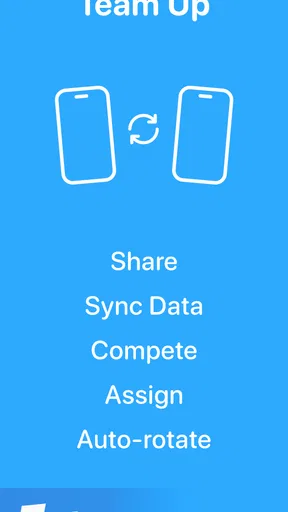
For households with other people, the option to add family members, delegate tasks, and sync across devices can make responsibility more visible. That is helpful when one person has quietly become the default manager of the home. A shared list can make it easier to agree on who handles which job, rather than relying on hints or hoping someone notices the bathroom needs attention.
I would use delegation to make expectations specific: assign a task to a person and agree what “done” means for that chore. The app can support coordination, but it cannot settle different standards of cleanliness or make an unwilling housemate participate. If sharing a list tends to create arguments in your home, a short conversation about boundaries may be more useful than adding more tasks.
Where it fits among cleaning tools
Compared with a notes app or a paper checklist, Tody gives chores a more visual sense of urgency and makes recurring household work easier to organize by room. A calendar can be better when a task has to happen on a particular date, and a general to-do app may suit someone who wants cleaning mixed with appointments, shopping, and work tasks. I would choose Tody when the main problem is deciding what to clean next, not when I need a full household command center.
It is also not a substitute for a professional cleaning service, a maintenance log, or a shared agreement about who is responsible for a home. Think of it as a planning aid: it can help you remember and distribute routine jobs, but the actual standard and effort still come from the people using it.
Small friction, and who should skip it
The main drawback in my experience is that reminders are only useful if they fit how you use your phone. I have occasionally missed one when the device was silent, so I would check the notification settings and test a reminder before relying on the app to prompt me. If you prefer to keep notifications off, you can still open the app when planning chores, but you lose some of the nudge that makes a routine easier to maintain.
There is also a setup cost: rooms, tasks, intervals, and shared responsibilities take thought. If you want a ready-made checklist that requires almost no decisions, a simple paper list may be faster. And if you find color-coded progress stressful, or you would rather clean spontaneously without tracking anything, this style of app may feel like unnecessary administration.
Everyday use and a practical starting point
Picture a weekday evening when you have a little energy but not enough for a full clean. Instead of walking through the house wondering where to begin, you check the room-based tasks, choose one that looks due, and finish it before dinner. Later in the week, a housemate can pick up a different assigned job. That is a modest workflow, but it addresses two common problems at once: decision fatigue and chores that stay invisible until someone complains.
For a smoother start, I would set up the rooms you use most, add a handful of recurring jobs, and leave less frequent or seasonal work out until the basic routine feels manageable. Then adjust the intervals based on what you notice. This keeps the app from becoming a giant inventory of everything a home might ever need, and gives you a useful answer to the practical question, “What is worth doing today?”
If you are deciding whether to pay for extra features, check the current in-app purchase options in the app before committing; listed items range from $0.99 to $79.99 each. The app itself is free, so I would first see whether its core way of organizing chores suits you rather than assuming you need to buy anything. It is rated for Everyone, and version 3.5.7 requires Android 8.0 or later.
For people who like visible progress and want a flexible cleaning rhythm, I think Tody is a thoughtful alternative to a bare checklist. It is especially useful for busy households, roommates, and anyone who tends to forget recurring jobs but dislikes strict calendars. People who want minimal setup, date-specific scheduling, or no tracking at all may be happier with another approach.
Why Tody is a Game Changer
Right off the bat, Tody impressed me with its simple yet effective approach to cleaning management. It's not just a glorified to-do list. Instead, it’s like having a personal assistant who politely nudges you to tackle those dust bunnies under the couch.
The app intuitively organizes tasks by cleaning needs rather than dates. So, instead of blindly following a rigid schedule, you focus on what truly needs attention. It’s like magic for procrastinators like me, who need a little extra push without the guilt trip.
Setting Up Your Cleaning Routine
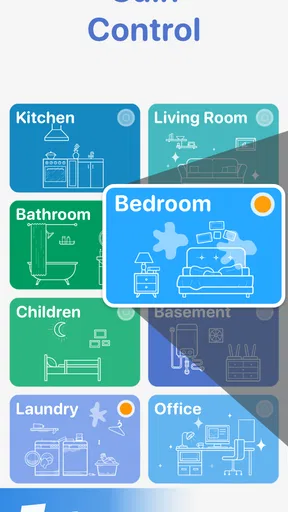
Setting up Tody is a breeze. You start by adding your home’s rooms and the cleaning tasks for each. You can customize the frequency of each task based on your personal preference and the app will suggest a cleaning cycle tailored to your lifestyle.
For instance, I realized I was over-cleaning my kitchen counters and under-cleaning the bathroom sink. The app’s insights helped me balance my chores efficiently. You can even adjust the task frequency if you find that your initial settings aren’t quite right.
Staying Motivated with Visual Progress
One of my favorite features is the visual progress tracker. It’s incredibly satisfying to see the little bar fill up as you complete tasks. It’s like a game where the prize is a sparkling clean home. Plus, the app uses a color-coded system to indicate which tasks need attention, making it super easy to prioritize.
On those days when motivation is hard to find, seeing half of the bathroom tasks in red was all I needed to roll up my sleeves and get to work. Motivational nudges without the nagging? Yes, please!
Customizing for Your Lifestyle
Another aspect where Tody shines is in its flexibility. You can add family members to the app, delegate tasks, and even sync it between devices. This makes it an ideal choice for families or roommates looking to share the cleaning load.
I added my partner to the app, and it was surprisingly fun to see who could clear their task list faster. It even sparked some friendly competition! The app’s ability to adapt to different household dynamics makes it a versatile tool for any living situation.
The User Experience
The user interface is sleek and straightforward. Even if you’re not tech-savvy, navigating the app feels intuitive. You won’t find yourself lost in a maze of settings or overly complicated menus. Plus, the app runs smoothly without any annoying glitches or crashes.
One small hiccup I encountered was the notification system. Sometimes, I’d miss a reminder if my phone was on silent. But, a quick tweak in the settings ensured I was always on top of my cleaning game.
Wrapping It Up
All in all, Tody - Smarter Cleaning is a breath of fresh air for anyone looking to streamline their cleaning routine. It’s like having a personal cleaning coach in your pocket, guiding you to a cleaner, happier home without the stress. Whether you’re a busy professional, a stay-at-home parent, or someone who just hates cleaning, this app has something to offer.
So, if you’re ready to say goodbye to cleaning chaos and hello to a smarter way of tidying up, give Tody a whirl. Trust me, your future self (and your floors) will thank you!
Pros
- Intuitive interface simplifies task management.
- Customizable schedules fit any lifestyle.
- Visual progress tracking boosts motivation.
- Shared tasks enhance family collaboration.
- Notifications ensure tasks aren't forgotten.
Cons
- Limited features in free version.
- Occasional sync issues with shared tasks.
- No integration with other smart home apps.
- Requires manual input for task updates.
- Lacks voice command functionality.
FAQs for Tody - Smarter Cleaning
What is Tody and how does it work?
Tody is a smart cleaning app designed to help users manage and schedule household cleaning tasks efficiently. It works by allowing users to create cleaning plans, assign tasks to different areas, and set reminders for when tasks are due. The app uses a visual tracker to show progress and motivate users to maintain a clean environment.
Does Tody require internet access to function?
No, Tody does not require an internet connection to function. It operates offline, so users can manage and update their cleaning schedules without needing to be connected to the internet. This makes the app convenient for users who prefer not to rely on constant connectivity.
Can Tody be used to manage cleaning tasks with multiple users?
Yes, Tody supports multiple users, which makes it ideal for families or roommates sharing cleaning responsibilities. Users can assign tasks to different people, track their progress, and ensure that everyone is contributing to maintaining a clean home. This feature helps in organizing tasks efficiently among different members.
Is Tody customizable for different cleaning needs?
Absolutely, Tody is highly customizable. Users can tailor cleaning plans to fit their specific needs by adjusting task frequency, setting personalized reminders, and choosing how tasks are prioritized. This flexibility ensures that the app caters to various cleaning styles and preferences, making it suitable for any household.
Does Tody offer any motivational features to encourage cleaning?
Yes, Tody includes motivational features such as visual progress tracking and achievement badges. These features are designed to inspire and motivate users to maintain their cleaning schedules. Seeing progress visually can boost motivation and satisfaction, making cleaning a more rewarding experience.


